
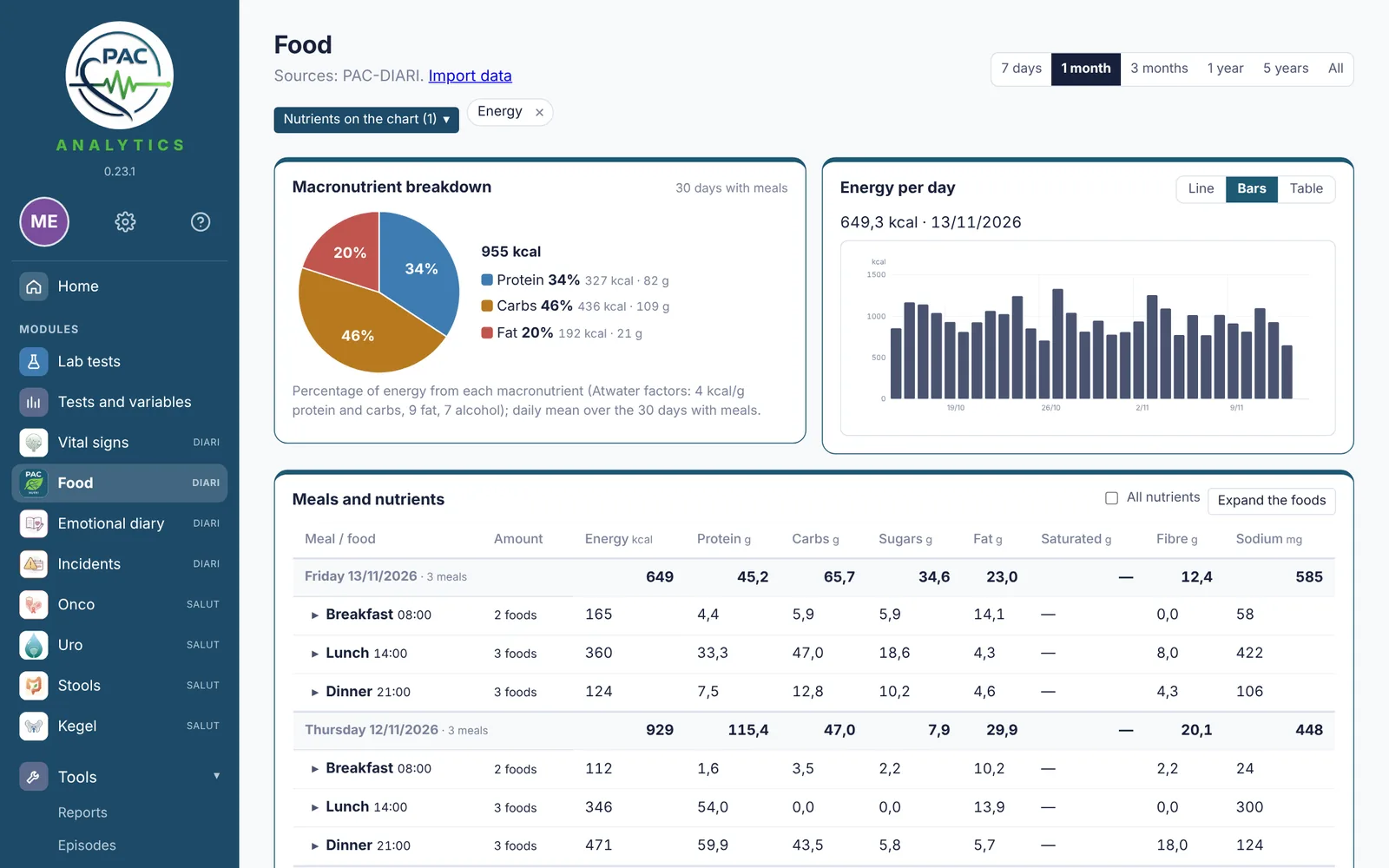
PAC Analytics: left-hand menu with lab results, tests and all the modules (Vital signs, Food, Emotional diary, Incidents, Onco, Uro, Stools, Kegel) and the Food screen with the macronutrient split and energy per day.

The piece that ties it all together.

Brings together your lab results (PDF or photos) and your PAC-SALUT, PAC-DIARI and Zepp data in a single database, so you can follow how they change and prepare cross-referenced reports for your appointments.

This is a first version: features are still being refined. It has mainly been tested with lab reports from Vall d’Hebron hospital (La Meva Salut) and Echevarne; other formats may need more manual checking.

Open PAC Analytics → analytics.pacientactiu.com

Cross-referenced reports

Choose the variables you want to see together — lab results, weight, blood pressure, nutrition, medication — and the episodes, such as surgery or treatments. The report places them on the same timeline: each chart marks the episode periods and the reference limits, so you can discuss at your appointment what changed and when.

Endocrinology report with real anonymised data: medical history and medication have been replaced with generic names.
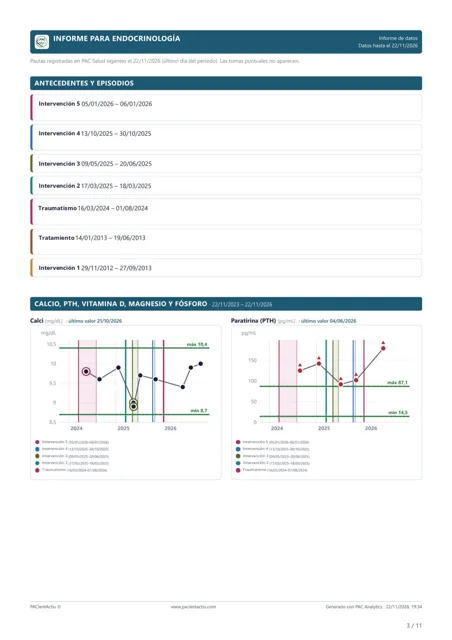
Page of a PAC Analytics cross-referenced report: list of episodes with their dates and calcium and PTH charts with the episodes marked.

Watches, bands and scales

PAC Analytics imports the data export from Zepp Life (formerly Mi Fit), the app for Xiaomi Mi Band fitness bands and Xiaomi scales, and from Zepp, the app for Amazfit watches. You request the export in the app and receive a folder of CSV files, which is imported as a whole.

  • Weight and body composition from each scale reading.
  • Daily steps, distance and calories, and activity segments.
  • Sleep each night: deep, light, REM and awake.
  • Heart rate: daily average, minimum and maximum, plus manual measurements.

Each brand exports in a different format. If you send us the export from your watch or band at participa@pacientactiu.com, we will keep adding them.

All sources, in a single database

Lab results and records from PAC-SALUT, PAC-DIARI and Zepp come together in a database that belongs to you and stays on your device. On the left, each module with data shows the app it comes from. Fictitious data in the screenshot.

PAC Analytics: left-hand menu with lab results, tests and all the modules (Vital signs, Food, Emotional diary, Incidents, Onco, Uro, Stools, Kegel) and the Food screen with the macronutrient split and energy per day.

PAC Analytics

What you can do

Lab results from PDF or photo

Drag in the PDFs (for example, from La Meva Salut) or photos. They are read on your device and uncertain values are flagged for you to check.

Test master

Each result is assigned to a single test, even if each lab names it differently. The original value, unit and range are always kept.

Limits and zones

The lab’s limit, a default one or the one your doctor sets, with an optional target value: green, amber and red zones on the charts.

Episodes

Surgery, hospital stays, infections or treatments with their period, so the charts show which results were taken during them.

Progress reports

Templates with the tests you choose (for example, parathyroid), with limits and episodes. Print to PDF and export to CSV.

All your sources

Import PAC-SALUT and PAC-DIARI backups and the Zepp Life and Zepp export (Xiaomi Mi Band, Amazfit). The source app is not changed. With the cloud folder, the encrypted copies PAC-DIARI saves to your cloud (Dropbox, Drive…) are imported automatically.

Your data

  • Documents are read on your device and the data is stored only in this browser: nothing is sent to any server.
  • If you clear the browser data, it is lost. Make backups (a single file) and keep them off the device.
  • By restoring the backup, you can move your data to another computer or to a tablet.
  • You can use the app in Catalan, Spanish, English or Basque.

It collects and shows; it does not interpret. PAC Analytics shows values, units, ranges and flags exactly as each lab printed them. It does not diagnose and does not replace the assessment of your healthcare team. Privacy

Try it with your lab results

Start with one lab report in PDF and check how it was read.

Errors and problems: support@pacientactiu.com
Suggestions and new types or formats of lab reports: participa@pacientactiu.com

How to install